What Is a VPN?
A VPN, short for Virtual Private Network, is a tool that helps make your internet connection more private and secure. It does this by encrypting your internet traffic and sending it through a secure VPN server before it reaches the websites, apps, or online services you use.
In simple terms, a VPN creates a private tunnel between your device and the internet. This makes it harder for your internet provider, people on public Wi-Fi, advertisers, or other third parties to see exactly what you are doing online.
A VPN does not make you completely anonymous, and it does not protect you from every online threat. However, it can be a useful privacy and security tool, especially when you are using public Wi-Fi, traveling, working remotely, or trying to reduce how much of your browsing activity is visible to others.
How Does a VPN Work?
When you normally browse the internet, your device connects through your internet service provider and then goes directly to the website or service you want to use. Your internet provider helps route that traffic, which means it may be able to see some information about the websites you visit.
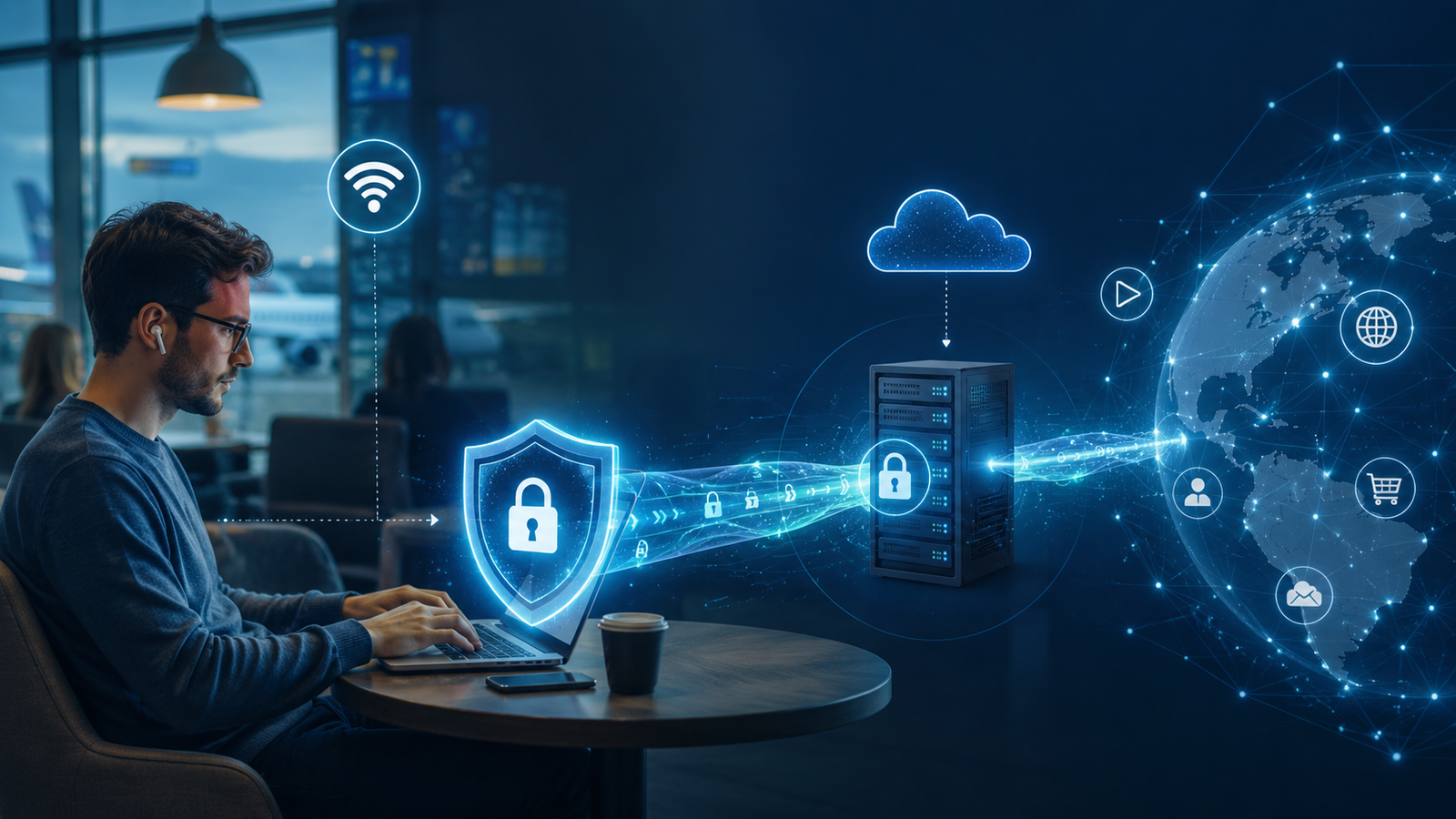
When you turn on a VPN, your internet traffic is encrypted before it leaves your device. It then travels to a VPN server operated by the VPN company. From there, the VPN server connects to the website or app you are using.
Because of this process, websites usually see the VPN server’s IP address instead of your real IP address. Your internet provider can still see that you are connected to a VPN, but it has a harder time seeing the specific websites or services you are visiting.
Why Do People Use a VPN?
People use VPNs for several reasons, but the most common ones are privacy, security, and protection on public networks. A VPN can help hide your browsing activity from your internet provider, protect your connection on public Wi-Fi, and make it harder for websites to see your real IP address.
For example, if you are using Wi-Fi at a hotel, airport, coffee shop, or restaurant, you may not know how secure that network is. A VPN adds another layer of protection by encrypting your connection. That makes it more difficult for someone else on the same network to monitor your activity.
A VPN can also be useful for people who travel often, work remotely, or want more control over their online privacy. It is not something every person needs every minute of the day, but it can be helpful in the right situations.
How a VPN Helps Protect Your Privacy
One of the biggest reasons people use a VPN is to keep more of their browsing activity private. Without a VPN, your internet provider may be able to see the websites you visit. Even when a website is secure, your provider may still see the domain name you connected to.
With a VPN turned on, your provider mostly sees that you are connected to a VPN server. It becomes harder for your provider to see each individual website you visit. This can be helpful for people who do not want their internet company to have an easy record of their browsing habits.
A VPN can also hide your real IP address from many websites. Your IP address can reveal your general location, such as your city or region, and can sometimes be used as part of a tracking profile. A VPN replaces your real IP address with the IP address of the VPN server, which gives you an added layer of privacy.
Why a VPN Is Useful on Public Wi-Fi
Public Wi-Fi is one of the best reasons to use a VPN. Networks at airports, hotels, coffee shops, libraries, and stores are convenient, but they are not always secure. Since many people use the same public network, there can be more risk compared to your home Wi-Fi.
On an unsafe public network, someone may try to monitor traffic, create a fake Wi-Fi network, or trick users into entering information on a fake website. A VPN helps reduce this risk by encrypting your connection. This makes it much harder for someone nearby to read your data.
This is especially important when you are logging in to email, checking financial accounts, shopping online, or accessing work files. While secure websites already provide protection, a VPN adds another layer between your device and the network you are using.
Can a VPN Hide Your Location?
A VPN can help hide your real IP address, which can make your location appear different from where you actually are. For example, if you connect to a VPN server in another city or country, websites may see the VPN server’s location instead of your real one.
However, a VPN does not hide every form of location tracking. Some apps and websites can still use GPS, Wi-Fi location data, Bluetooth, cookies, account logins, or browser information to figure out where you are. This is especially true on phones, where apps may have direct access to location services.
So, while a VPN can help mask your IP-based location, it does not guarantee total location privacy. It is best to think of it as reducing one major tracking method, not eliminating every possible way your location could be known.
What a VPN Does Not Protect You From
A VPN is useful, but it is not a complete security solution. It does not stop you from clicking a scam link, downloading a bad file, installing malware, or entering your password on a fake website. It also does not automatically protect your accounts if you use weak passwords.
For example, if you receive a phishing email that looks like it came from your bank and you type your password into a fake website, a VPN will not know that the site is fake. It protects the connection, but it does not make every website safe.
A VPN also does not make you completely anonymous online. If you log in to Google, Facebook, Amazon, your bank, or another personal account, that service can still know it is you. Websites can also use cookies and other tracking methods that a VPN alone does not block.
Can a VPN Slow Down Your Internet?
Yes, a VPN can sometimes slow down your internet connection. Since your data has to travel through a VPN server before reaching the final website, there may be a small delay. The speed difference depends on the VPN provider, server location, server load, and your internet connection.
A good VPN provider usually has fast servers and may only cause a small speed drop. A lower-quality VPN, overloaded server, or distant server can make browsing, downloads, or streaming feel slower.
For the best performance, it usually helps to choose a VPN server close to your actual location. If you are in the United States, for example, a nearby U.S. server will often be faster than a server on the other side of the world.
Are Free VPNs Safe?
Free VPNs can be useful in limited situations, but they should be used carefully. Running a VPN service costs money, so if a company offers a completely free VPN, it may make money in other ways. This could include ads, speed limits, data limits, upgrade prompts, or collecting certain types of user information.
Not every free VPN is automatically bad, but privacy is the main reason many people use a VPN in the first place. If the VPN provider itself is collecting too much data, that defeats part of the purpose.
For people who care about privacy, security, and reliable performance, a reputable paid VPN is usually the better choice. Look for a company with a clear privacy policy, strong encryption, good reviews, reliable apps, and a history of taking privacy seriously.
Who Should Consider Using a VPN?
A VPN may be a good idea if you regularly use public Wi-Fi, travel often, work remotely, or want more privacy from your internet provider. It can also be useful if you often connect to networks you do not fully trust, such as hotel Wi-Fi, airport Wi-Fi, or shared office networks.
Remote workers may also benefit from VPNs, especially if their company requires one to access private systems, files, or internal tools. In this case, the VPN is not just for personal privacy. It helps protect company data and creates a secure connection between the employee and the business network.
Average home users may not need to keep a VPN on all the time, but it can still be useful in certain situations. If you are doing sensitive tasks on a public network or simply want more privacy while browsing, turning on a VPN can be a smart extra step.
Is a VPN Worth It?
For many people, a VPN is worth considering, especially if they value privacy or use public Wi-Fi often. It can help protect your connection, hide your real IP address from many websites, and reduce how much your internet provider can see about your browsing activity.
However, a VPN should not be seen as a magic shield. It is only one part of good online security. You should still use strong passwords, enable two-factor authentication, keep your devices updated, avoid suspicious links, and be careful about what you download.
The best way to think about a VPN is as an extra layer of protection. It will not solve every privacy or security problem, but it can make everyday internet use safer and more private.
Final Thoughts
A VPN is a practical tool that helps protect your internet connection by encrypting your traffic and masking your real IP address. It is especially useful on public Wi-Fi, while traveling, or when using networks you do not fully trust.
For the average person, a VPN is not difficult to understand: it helps create a safer, more private path between your device and the internet. It will not make you completely anonymous or protect you from every scam, but it can be a valuable part of your overall online safety setup.
If you want more privacy from your internet provider, better protection on public Wi-Fi, and more control over your online connection, a VPN may be worth using.
Frequently Asked Questions About VPNs
What does VPN stand for?
VPN stands for Virtual Private Network. It is a service that helps create a more private and secure internet connection by encrypting your traffic and routing it through a VPN server.
Do I really need a VPN?
Not everyone needs a VPN all the time, but it can be very useful if you use public Wi-Fi, travel often, work remotely, or want more privacy from your internet provider and websites.
Does a VPN make me anonymous?
No, a VPN does not make you completely anonymous. It can hide your real IP address and protect your connection, but websites can still track you through account logins, cookies, browser data, and other methods.
Does a VPN protect me from hackers?
A VPN can help protect you on unsafe networks by encrypting your connection, especially on public Wi-Fi. However, it does not protect you from every type of hacking, phishing scam, malware, or fake website.
Should I use a VPN on public Wi-Fi?
Yes, public Wi-Fi is one of the best times to use a VPN. A VPN adds encryption and helps protect your data when you are connected to networks at airports, hotels, coffee shops, libraries, or restaurants.
Can my internet provider see what I do with a VPN?
Your internet provider can usually see that you are connected to a VPN, but it has a much harder time seeing the specific websites you visit while the VPN is active.
Will a VPN slow down my internet?
A VPN can slow down your internet slightly because your traffic is being routed through a VPN server. A good VPN provider and a nearby server can help reduce the speed difference.
Are free VPNs safe to use?
Some free VPNs are okay for basic use, but many have limits or privacy concerns. Since running a VPN costs money, free services may rely on ads, data limits, or other business models. A reputable paid VPN is usually better for privacy and performance.
Can I use a VPN on my phone?
Yes, most major VPN services offer apps for iPhone and Android. A phone VPN can be especially useful when using public Wi-Fi or traveling.
Is a VPN legal?
In most countries, using a VPN is legal. However, a VPN does not make illegal activity legal, and some countries have restrictions on VPN use. Most average users use VPNs for privacy, security, remote work, and safer browsing.