
Artificial intelligence has moved far beyond being a novelty. In 2026, AI tools can help you write, research, design graphics, generate video, summarize documents, automate business tasks, code software, improve emails, and organize your entire workflow. The challenge is not finding AI software anymore. The challenge is knowing which AI tool is best for the job.
Here are ten of the best AI websites and software platforms to use right now, along with their biggest strengths and who should consider using them.
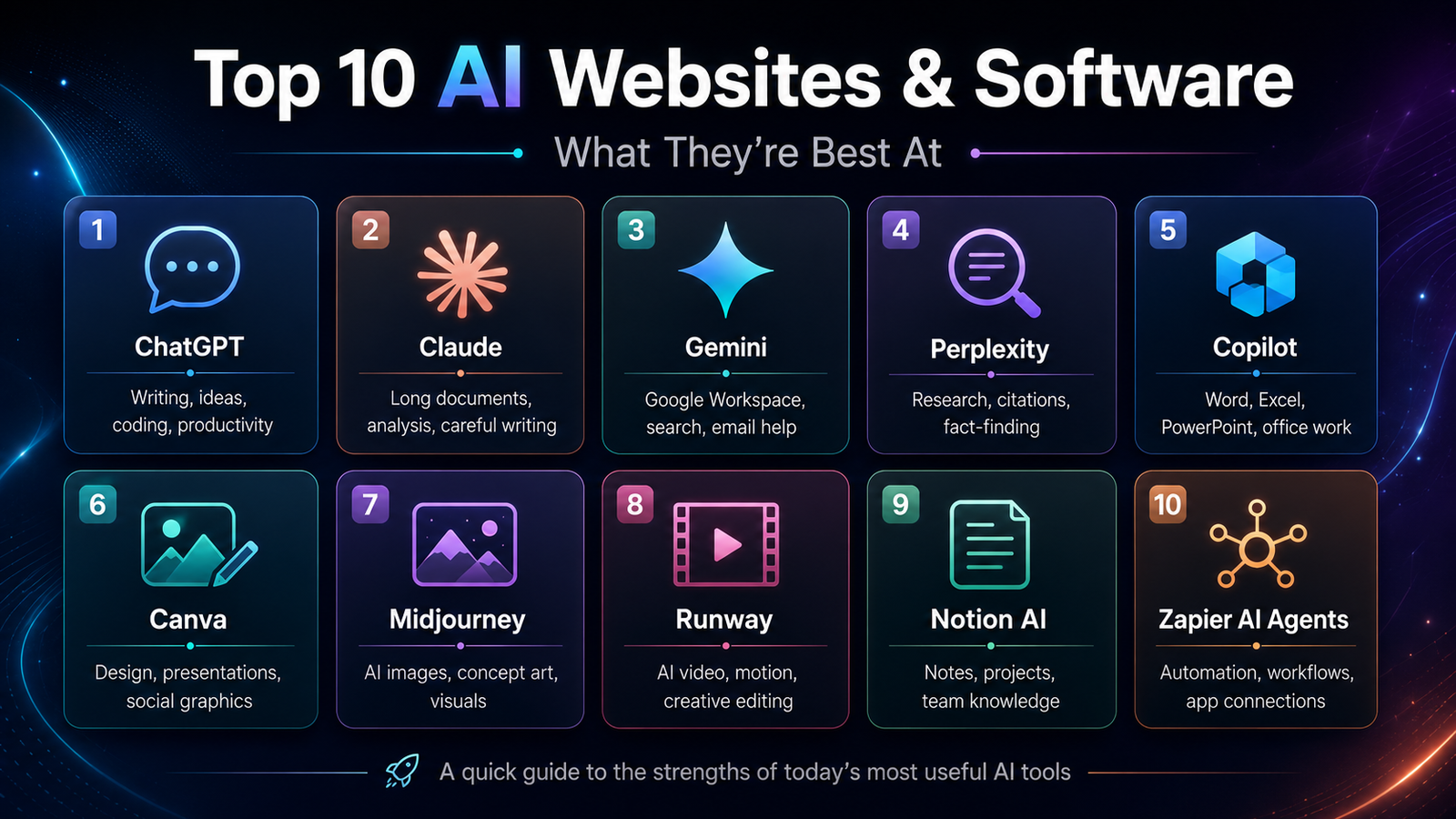
1. ChatGPT
ChatGPT remains one of the most useful all-around AI tools because it can handle so many different tasks in one place. It can help write articles, summarize documents, brainstorm YouTube ideas, create outlines, explain complicated topics, help with coding, generate images, and act like a general productivity assistant. OpenAI’s own data shows ChatGPT adoption continued broadening in early 2026, especially among users over 35, which suggests it has moved well beyond early tech enthusiasts and into mainstream daily use.
Biggest strengths: writing, brainstorming, coding help, research assistance, image generation, document summaries, everyday productivity.
Best for: students, creators, business owners, marketers, programmers, and anyone who wants one AI tool that can do a little bit of everything.
ChatGPT is probably the best first AI tool for most people because it is flexible. You can ask it to write a blog post, compare two products, create a video script, explain a financial topic, or help organize a project. Its biggest advantage is that it feels less like a single-purpose app and more like an AI workspace.
2. Claude
Claude, from Anthropic, is one of the strongest AI tools for long-form writing, careful reasoning, document analysis, and professional work. Anthropic positions Claude around helpfulness, safety, and reliability, and the company continues to expand Claude’s capabilities across research, coding, and business use.
Biggest strengths: long-form writing, document review, careful analysis, summarizing large amounts of text, coding, and professional communication.
Best for: writers, researchers, lawyers, analysts, business professionals, and anyone who works with long documents.
Claude is especially good when you need a more thoughtful response. It often shines when you give it a long document and ask it to explain the key points, find problems, rewrite sections, or summarize it in a clearer way. For people who work with contracts, reports, scripts, policies, or research, Claude can be extremely useful.
3. Google Gemini
Google Gemini is a strong choice for people who already live inside Google’s ecosystem. Google has been adding Gemini features across its apps, including Docs, Sheets, Slides, Drive, Search, Maps, and more. In its March 2026 AI update, Google highlighted expanded Search Live, stronger AI tools in Workspace apps, Maps improvements, and more personalized AI features.
Biggest strengths: Google Workspace integration, search, document help, email help, spreadsheet assistance, Android integration, and image-related features.
Best for: Google Docs, Gmail, Android, Google Drive, and Chromebook users.
The biggest reason to use Gemini is integration. If your documents, email, calendar, cloud files, and browser activity are already tied to Google, Gemini can become a convenient AI layer on top of the tools you already use. It may not always be the first choice for every creative task, but for people who rely on Google services, it is one of the most practical AI assistants.
4. Perplexity
Perplexity is one of the best AI tools for research. Instead of giving you a list of search results like a traditional search engine, Perplexity gives direct answers with source citations so you can quickly verify where the information came from. Perplexity has also been expanding beyond search, with AI browser features, memory improvements, coding support, and agent-style tools.
Biggest strengths: web research, source citations, product comparisons, quick summaries, current information, and answering fact-based questions.
Best for: researchers, students, journalists, shoppers, writers, and anyone who wants faster answers from the web.
Perplexity is useful when accuracy and sources matter. For example, if you are researching a product, comparing software, looking up a recent news story, or trying to understand a technical topic, Perplexity can save time by pulling information together and showing where it came from.
5. Microsoft Copilot
Microsoft Copilot is best for people who use Microsoft 365, Windows, Edge, Outlook, Word, Excel, PowerPoint, and Teams. Microsoft says Copilot is built into Microsoft 365 apps, which makes it useful for writing documents, summarizing emails, creating presentations, analyzing spreadsheets, and helping with meetings.
Biggest strengths: Word, Excel, PowerPoint, Outlook, Teams, Edge, business workflows, email summaries, and productivity.
Best for: office workers, managers, business teams, students, and anyone who uses Microsoft 365 every day.
Copilot’s biggest strength is that it sits inside the apps many people already use for work. Instead of copying text into a separate AI tool, you can use AI directly inside Word, Excel, PowerPoint, Outlook, and Edge. Microsoft has also been adding more AI features to Edge, including the ability for Copilot to work across open tabs with user permission.
6. Canva
Canva has become one of the easiest AI-powered design platforms for non-designers. It lets people create social media posts, presentations, posters, videos, logos, documents, and other visuals. Canva describes itself as a free online graphic design tool for creating social posts, presentations, posters, videos, logos, and more.
Biggest strengths: graphic design, templates, presentations, social media images, simple video editing, AI image tools, and marketing graphics.
Best for: creators, small businesses, teachers, marketers, YouTubers, and people who need professional-looking visuals quickly.
Canva is not just for basic design anymore. It has been adding more AI-assisted features, including tools that help create and edit images, videos, and layered designs. Canva’s Magic Layers feature, for example, can separate flat image files into editable layers, making it easier to modify AI-generated or static designs without starting over.
7. Midjourney
Midjourney is one of the strongest AI image generators for artistic, cinematic, and visually impressive images. The company describes itself as an independent research lab exploring new mediums and expanding human imagination.
Biggest strengths: AI art, cinematic images, concept art, thumbnail concepts, fantasy scenes, product mockups, and visually striking creative work.
Best for: artists, designers, YouTubers, advertisers, concept creators, and anyone who wants beautiful AI-generated visuals.
Midjourney is especially strong when the goal is image quality and style. It can create dramatic lighting, detailed scenes, stylized portraits, futuristic product concepts, and polished artwork. It is less of a general productivity tool and more of a creative image engine.
For YouTube creators, Midjourney can be useful for concept art, background visuals, mood boards, and thumbnail ideas. The main downside is that it may require more prompt experimentation than tools built directly into broader productivity platforms.
8. Runway
Runway is one of the top AI tools for video generation and AI-assisted video editing. Runway’s site highlights Gen-4.5 as a major video generation model focused on visual fidelity and creative control.
Biggest strengths: text-to-video, image-to-video, cinematic AI clips, visual effects, video editing, motion generation, and creative video production.
Best for: video creators, filmmakers, YouTubers, marketers, agencies, and social media teams.
Runway is useful when you want to create short cinematic clips, animate images, generate B-roll, or experiment with video ideas that would otherwise require a camera crew or stock footage. Its Gen-4 technology can use visual references and instructions to create videos with more consistent subjects, styles, and locations.
For creators, Runway can be powerful for intros, transitions, product concepts, ads, and visual storytelling. It is not perfect, and AI video can still struggle with complex motion or exact details, but it is one of the most important tools in the AI video category.
9. Notion AI
Notion AI is best for people who use Notion as a workspace for notes, projects, documents, databases, and team collaboration. Notion describes its AI as a “24/7 AI team,” with agents that can build, edit, search, and take action inside a workspace.
Biggest strengths: notes, project management, workspace search, team knowledge, meeting notes, custom agents, and repetitive task automation.
Best for: teams, students, creators, startups, project managers, and people who organize everything in Notion.
Notion AI is strongest when your information already lives inside Notion. It can help summarize meeting notes, draft documents, search across connected tools, and automate repetitive workspace tasks. In 2026, Notion has also been expanding custom agents and custom skills, allowing teams to create AI helpers for repeated workflows.
If you are already a Notion user, Notion AI can make the app much more powerful. If you are not a Notion user, it may not be the first AI tool to try.
10. Zapier AI Agents
Zapier is one of the most useful AI tools for automation. Instead of only answering questions or generating content, Zapier can connect apps together and automate real work across thousands of services. Zapier says its AI Agents can be equipped with company knowledge and can do work across more than 9,000 apps.
Biggest strengths: workflow automation, business processes, app integrations, AI agents, lead handling, email workflows, data movement, and repetitive task automation.
Best for: small businesses, creators, sales teams, support teams, marketers, and operations teams.
Zapier is powerful because it connects AI to action. For example, you could create an automation that summarizes form responses, adds leads to a CRM, drafts follow-up emails, updates a spreadsheet, sends Slack alerts, and creates tasks. Zapier also emphasizes human-in-the-loop approvals, dashboards, model flexibility, and enterprise controls for AI agents.
Zapier is not the flashiest AI tool, but for businesses it can be one of the most valuable because it saves time on repetitive tasks.
Honorable Mention: Grammarly
Grammarly deserves an honorable mention because it is one of the easiest AI tools to use every day. Grammarly describes itself as AI writing assistance that works across apps and websites, helping with personalized guidance and text generation.
Biggest strengths: grammar, spelling, tone, rewriting, email polish, clarity, and professional communication.
Best for: students, business professionals, writers, job seekers, and anyone who writes a lot of emails or documents.
Grammarly is not as broad as ChatGPT or Claude, but it is extremely useful because it works where you already type. It is especially helpful for making emails sound more professional, cleaning up grammar, shortening long sentences, and improving tone.
Which AI Tool Should You Use?
The best AI tool depends on what you are trying to do.
For general writing, brainstorming, coding, and everyday AI help, ChatGPT is the best place to start. For long documents and careful analysis, Claude is excellent. For Google users, Gemini makes the most sense. For research with sources, Perplexity is one of the best choices. For Microsoft Office users, Copilot is the most convenient. For design, Canva is the easiest. For high-end AI images, Midjourney is one of the strongest. For AI video, Runway is one of the leaders. For organizing notes and team knowledge, Notion AI is very useful. For automating business workflows, Zapier AI Agents may save the most time.
The smartest approach is not to pick just one AI tool. Most people will get the best results by using two or three tools together. For example, a creator might use ChatGPT for script ideas, Perplexity for research, Canva for graphics, Midjourney for image concepts, and Runway for short video clips. A business owner might use Claude for documents, Copilot for Microsoft 365, Grammarly for emails, and Zapier to automate repetitive work.
AI software is changing quickly, but the core idea is simple: use the right tool for the right job. The people who get the most out of AI in 2026 will not just be the people using AI. They will be the people who understand which AI tool is strongest for each task.