
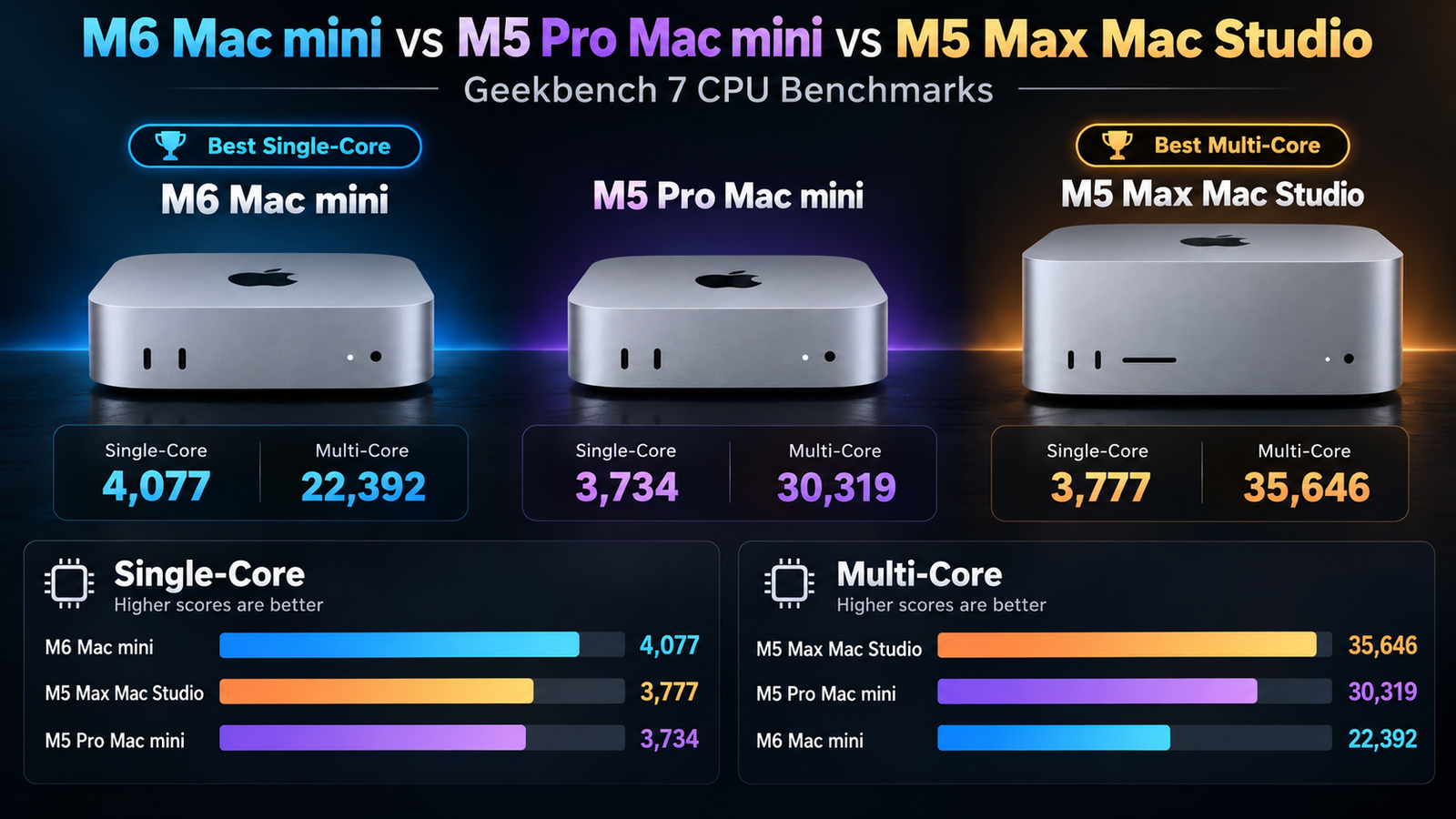
Apple’s latest desktop Macs are delivering impressive performance, but how do they compare when it comes to raw CPU power? With the M6 Mac mini, M5 Pro Mac mini, and M5 Max Mac Studio now available, Geekbench 7 results provide an interesting look at what buyers can expect from these three machines.
What’s particularly interesting is that the less expensive M6 Mac mini actually beats both the M5 Pro and M5 Max in single-core performance, while the more powerful chips pull ahead in multi-core workloads.
Let’s take a closer look at the numbers and what they mean for everyday users and professionals.
Geekbench 7 Benchmark Results
The following scores come from published Geekbench 7 CPU benchmark results.
| Apple Desktop | Single-Core | Multi-Core |
|---|---|---|
| M6 Mac mini (12-core CPU) | 4,077 | 22,392 |
| M5 Pro Mac mini (15-core CPU) | 3,734 | 30,319 |
| M5 Max Mac Studio (18-core CPU) | 3,777 | 35,646 |
These are individual Geekbench 7 test results, not averages. Scores may vary slightly depending on the configuration, macOS version, and testing conditions.
M6 Mac mini: A Single-Core Performance Champion
The M6 Mac mini delivers an impressive single-core score of 4,077, making it the fastest of these three machines in this particular Geekbench 7 comparison.
That’s approximately 9% faster than the M5 Pro Mac mini and 8% faster than the M5 Max Mac Studio in single-core performance.
Single-core speed remains particularly important for everyday computing tasks, including web browsing, opening applications, working in office software, and many tasks in macOS.
The M6 achieves a multi-core score of 22,392 with its 12-core CPU. While that falls behind Apple’s higher-end desktop chips, it is still a strong result for a compact entry-level desktop.
For most everyday Mac users, the M6 Mac mini offers an excellent combination of responsiveness and processing power without needing to step up to a more expensive computer.
M5 Pro Mac mini: A Big Jump in Multi-Core Performance
The M5 Pro Mac mini takes a different approach, offering additional CPU cores for users who need stronger performance in demanding applications.
In this 15-core configuration, the M5 Pro delivers a single-core score of 3,734 and a multi-core score of 30,319.
That gives the M5 Pro approximately 35% more multi-core performance than the M6 Mac mini, despite the M6 holding the advantage in single-core speed.
This additional multi-core performance can be especially useful for activities such as video encoding, software compilation, multitasking with CPU-intensive applications, and professional creative workloads.
The M5 Pro Mac mini therefore represents an attractive middle ground. It provides considerably more processing power than the standard M6 for heavily threaded workloads without requiring buyers to move up to a Mac Studio.
It’s also worth noting that the M5 Pro is available in different CPU configurations. The 15-core model is used for this comparison, and higher-core configurations can deliver different results.
M5 Max Mac Studio: The Multi-Core Performance Leader
For users who need even greater CPU performance, the M5 Max Mac Studio takes the lead in this three-way comparison.
The 18-core M5 Max delivers a Geekbench 7 single-core score of 3,777 and a multi-core score of 35,646.
That makes the M5 Max approximately 18% faster than the 15-core M5 Pro Mac mini in multi-core performance.
Compared with the standard M6 Mac mini, the M5 Max delivers approximately 59% higher multi-core performance.
Those differences can become particularly meaningful for professionals handling complex video production, 3D rendering, large software builds, and other workloads that efficiently utilize multiple CPU cores.
However, an interesting takeaway is that the M5 Max doesn’t provide a substantial single-core performance advantage over the M5 Pro. In fact, both are outperformed by the newer M6 in this particular single-core comparison.
The Mac Studio also offers advantages beyond CPU benchmarks, including more powerful GPU configurations, higher memory capacities, and greater memory bandwidth for demanding professional applications.
What Do Single-Core and Multi-Core Scores Actually Mean?
Geekbench 7 measures different aspects of CPU performance.
Single-core performance measures how quickly a processor can complete tasks using one CPU core. Higher results generally indicate stronger performance in applications or operations that depend heavily on one core.
Multi-core performance measures CPU performance when multiple cores work together. This becomes particularly important for applications capable of distributing work across many cores.
For someone who primarily browses the web, uses email, edits documents, and performs occasional photo or video editing, the M6 Mac mini may provide all the performance they need.
However, users who regularly export complex video projects, render 3D scenes, or perform other heavily threaded tasks can benefit from the additional processing capabilities of the M5 Pro and M5 Max.
Keep in mind that Geekbench 7 measures CPU performance. It does not tell the complete story about GPU performance, memory bandwidth, SSD speed, sustained performance, or AI acceleration.
Which Apple Desktop Is the Best Choice?
Based on these Geekbench 7 results, each machine has its own advantages.
- M6 Mac mini: Best suited for everyday users looking for excellent single-core performance and strong overall speed in a compact desktop.
- M5 Pro Mac mini: A good choice for enthusiasts and professionals who need considerably more multi-core processing power without stepping up to a Mac Studio.
- M5 Max Mac Studio: Designed for demanding professional users who benefit from greater CPU performance, more GPU capability, and expanded memory options.
Final Thoughts
Perhaps the biggest surprise in these Geekbench 7 benchmarks is just how competitive Apple’s standard M6 chip has become.
Despite being positioned below the M5 Pro and M5 Max, the M6 delivers the highest single-core score among these three computers. That demonstrates how Apple’s newer chip architecture can improve everyday responsiveness even when compared with more expensive professional machines.
However, when workloads can take advantage of additional CPU cores, the M5 Pro and M5 Max quickly establish their advantage.
The M5 Pro delivers about 35% better multi-core performance than the M6, while the M5 Max extends that advantage to approximately 59%.
For buyers, the important takeaway is that the most expensive Mac isn’t necessarily the fastest at every task. Choosing the right machine depends heavily on the type of work you plan to perform.
For everyday computing, the M6 Mac mini looks particularly compelling. For demanding professional workflows, the M5 Pro Mac mini and M5 Max Mac Studio offer considerable additional processing power.