What Is an Email Scam?
An email scam is a fake or misleading message designed to trick you into giving away money, passwords, personal information, or access to your accounts. These scams are often called phishing emails because the scammer is “fishing” for sensitive information.
Scam emails may pretend to come from banks, delivery companies, online stores, streaming services, tech companies, government agencies, or even people you know. Some are easy to spot, but many are designed to look realistic. A scam email may use a company logo, professional-looking formatting, and urgent language to make you react quickly.
The most important thing to remember is this: if an email makes you feel rushed, scared, excited, or pressured to click something immediately, slow down before taking action.
Why Scam Emails Are So Common
Email scams are common because they are easy for criminals to send in large numbers. A scammer can send thousands or even millions of emails hoping that a small number of people will click a link, open an attachment, call a fake support number, or enter personal information.
These emails work because they often target everyday situations. You may receive a message saying your package cannot be delivered, your payment failed, your account was locked, your password expired, or you won a prize. These are familiar topics, which makes the message seem more believable.
Scammers also know that many people check email quickly on their phones. When you are busy, distracted, or in a hurry, it is easier to miss warning signs.
Common Signs an Email Is a Scam
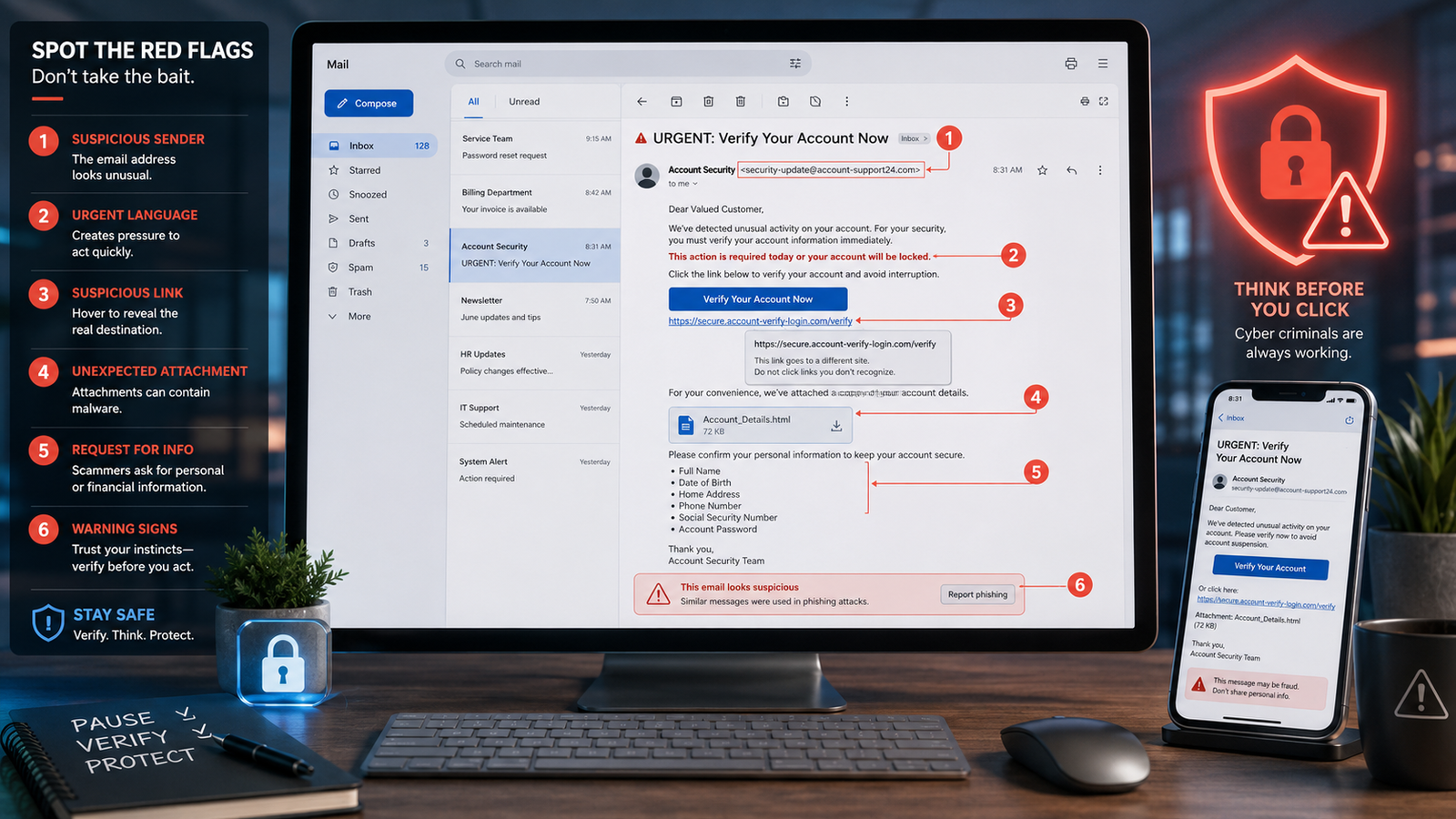
One of the biggest signs of a scam email is urgency. Scammers often use phrases like “act now,” “your account will be closed,” “payment failed,” “final warning,” or “verify immediately.” The goal is to make you panic and click before thinking.
Another common sign is a suspicious sender address. The sender name may say “Apple,” “Amazon,” “PayPal,” “Netflix,” or your bank, but the actual email address may look strange. It may include extra letters, random numbers, misspellings, or a domain that does not match the real company.
Scam emails may also include suspicious links, unexpected attachments, poor grammar, strange formatting, requests for private information, or offers that sound too good to be true.
Check the Sender’s Email Address
Do not trust the display name alone. A scammer can make the sender name look like a real company or person. The actual email address is more important.
For example, an email may appear to come from “Amazon Support,” but the address could be something random or misspelled. A real company usually sends email from its official domain. If the email address looks unrelated, overly long, full of random characters, or slightly misspelled, that is a major warning sign.
Be especially careful with small changes that are easy to miss, such as replacing letters, adding hyphens, or using a domain that looks similar to the real one.
Watch Out for Urgent or Threatening Language
Scammers want you to act quickly. They may claim your account will be suspended, your password has expired, your payment failed, or your package will be returned unless you respond right away.
Real companies may send security alerts or billing reminders, but they usually do not threaten you with extreme consequences if you do not click a link immediately. If the email is trying to scare you, pressure you, or rush you, take a moment to verify it another way.
A good rule is to avoid clicking links in urgent emails. Instead, open your browser and go directly to the official website or app.
Be Careful With Links
Links are one of the most dangerous parts of scam emails. A button may say “Verify Account,” “Track Package,” “Update Payment,” or “Cancel Order,” but the link may take you to a fake website.
On a computer, you can usually hover your mouse over a link to preview where it goes. On a phone, you can press and hold the link to preview the address. If the web address looks strange, misspelled, shortened, or unrelated to the company, do not open it.
Even if the website looks real, check the address carefully. Scammers often create fake login pages that look almost identical to real websites. Their goal is to steal your username, password, payment details, or two-factor authentication code.
Do Not Trust Unexpected Attachments
Scam emails often include attachments that look like invoices, receipts, shipping labels, resumes, tax documents, security notices, or account statements. Opening a dangerous attachment can install malware, steal data, or trick you into giving access to your computer.
Be cautious with attachments you were not expecting, even if they appear to come from someone you know. If a file seems unusual, contact the sender using another method before opening it.
This is especially important if the email asks you to enable macros, install software, enter your password, or bypass a security warning.
Be Suspicious of Requests for Personal Information
Legitimate companies usually will not ask you to send sensitive information by email. Be very cautious if an email asks for your password, Social Security number, credit card number, bank account information, one-time security code, or login details.
A common scam is to send a fake alert saying there is a problem with your account. The email then asks you to click a link and “confirm” your information. In reality, the link takes you to a fake website controlled by the scammer.
When in doubt, do not use the link in the email. Go directly to the company’s official website or app and check your account there.
Fake Invoices and Payment Scams
Fake invoice scams are very common. You may receive an email claiming you bought something expensive, renewed a subscription, or owe money. The message may include a phone number to call if you want to cancel the charge.
The goal is often to scare you into calling a fake support line. Once you call, the scammer may try to get remote access to your computer, convince you to send money, or ask for banking information.
If you receive a surprising invoice or payment notice, do not call the number in the email. Check your account directly through the official website, app, or a trusted phone number from the company’s real website.
Scammers May Pretend to Be Someone You Know
Not all scam emails pretend to be large companies. Some scammers impersonate your boss, coworker, friend, or family member. They may ask you to buy gift cards, transfer money, send sensitive information, or change payment details.
These messages often sound urgent or unusual. For example, a scammer may say they are in a meeting and cannot talk, but they need you to buy gift cards immediately. This is a major red flag.
If someone asks for money, gift cards, passwords, or account changes by email, verify the request through another method before doing anything.
Be Careful With “Too Good to Be True” Offers
Scam emails often promise prizes, refunds, giveaways, investment opportunities, job offers, or government payments. These messages are designed to make you excited enough to click a link or provide information.
If you did not enter a contest, apply for the offer, or request the information, be skeptical. A message saying you won a prize or qualify for a special payment may be an attempt to steal your information or charge you a fake fee.
A simple rule applies: if an email sounds too good to be true, it probably deserves extra caution.
What to Do If You Think an Email Is a Scam
If an email seems suspicious, do not reply, click links, open attachments, or call phone numbers listed in the message. Instead, mark it as spam or phishing in your email app.
Most major email services, including Gmail, Outlook, Yahoo, and Apple Mail, have ways to report suspicious messages. Reporting scams helps your email provider block similar messages in the future.
You can also delete the email after reporting it. Do not engage with the sender, because replying may confirm that your email address is active.
What to Do If You Clicked a Scam Email
If you clicked a suspicious link, stay calm and act quickly. Close the page and do not enter any more information. If you typed in a password, change that password immediately from the official website or app.
If you reused that password on other accounts, change it there too. Turn on two-factor authentication if it is available. If you entered credit card or bank information, contact your bank or credit card company right away.
If you downloaded a file or opened an attachment, run a security scan on your device. If your computer starts acting strangely, consider getting help from a trusted technician.
How to Protect Yourself From Email Scams
The best protection is to slow down and verify. Scammers rely on quick reactions. Before trusting an email, check the sender address, inspect links, watch for urgent language, avoid unexpected attachments, and never send private information by email.
Use strong, unique passwords for your important accounts. Turn on two-factor authentication for your email, bank, Apple ID, Google account, Microsoft account, PayPal, and social media accounts.
Also, keep your phone, computer, browser, and security software updated. Updates often fix security problems that scammers and hackers try to exploit.
Final Thoughts
Scam emails are designed to look convincing, but they usually leave clues. Suspicious sender addresses, urgent warnings, strange links, unexpected attachments, fake invoices, requests for private information, and offers that seem too good to be true are all warning signs.
The safest approach is simple: do not rush. If an email asks you to click, pay, reply, download, or share information immediately, stop and verify it first. A few extra seconds of caution can help protect your money, accounts, and personal information.
Frequently Asked Questions About Scam Emails
What is a scam email?
A scam email is a fake or misleading email designed to trick you into giving away money, passwords, personal information, or account access. Many scam emails pretend to come from real companies or people you know.
What is phishing?
Phishing is a type of scam where criminals pretend to be a trusted company, organization, or person to steal sensitive information. This may include passwords, credit card numbers, bank details, or security codes.
How can I tell if an email is fake?
Look for warning signs such as urgent language, suspicious sender addresses, strange links, unexpected attachments, poor grammar, fake invoices, or requests for personal information. When in doubt, go directly to the company’s official website or app.
Should I click links in emails?
Be careful with links in unexpected emails. If the email is about your bank, delivery, payment, account, or password, it is safer to open the official app or type the website address yourself instead of clicking the email link.
Can scam emails look real?
Yes. Many scam emails use real company logos, professional formatting, and convincing language. Some fake emails are very hard to spot, which is why it is important to check the sender address and links carefully.
What should I do if I opened a scam email?
Simply opening an email is usually not the biggest problem. The danger usually comes from clicking links, opening attachments, downloading files, replying with information, or entering login details on a fake website.
What should I do if I clicked a scam link?
Close the page and do not enter more information. If you typed in a password, change it immediately from the official website or app. If you entered payment information, contact your bank or credit card company.
What should I do if I downloaded an attachment from a scam email?
Run a security scan on your device. Do not enable macros or install anything the attachment asks for. If your computer behaves strangely afterward, get help from a trusted technician.
Can scammers fake a sender name?
Yes. Scammers can make the display name look like a real company or person. Always check the full email address, not just the name shown in your inbox.
Do companies ask for passwords by email?
Legitimate companies usually do not ask you to send passwords, two-factor authentication codes, Social Security numbers, or payment details by email. Treat these requests as suspicious.
Is bad spelling always a sign of a scam?
Bad spelling and grammar can be warning signs, but not all scam emails have mistakes. Modern scam emails can look polished and professional, so you should also check links, sender addresses, attachments, and the overall request.
How do I report a scam email?
Most email services have a “Report spam” or “Report phishing” option. Use that feature before deleting the message. Reporting helps your email provider block similar scams in the future.
Can two-factor authentication protect me from email scams?
Two-factor authentication can help protect your accounts if your password is stolen. It is not perfect, but it adds an important extra layer of security.
What is the safest way to check if an email is real?
Do not use the links or phone numbers in the email. Instead, go directly to the company’s official website, open the official app, or contact the company using a trusted phone number.