
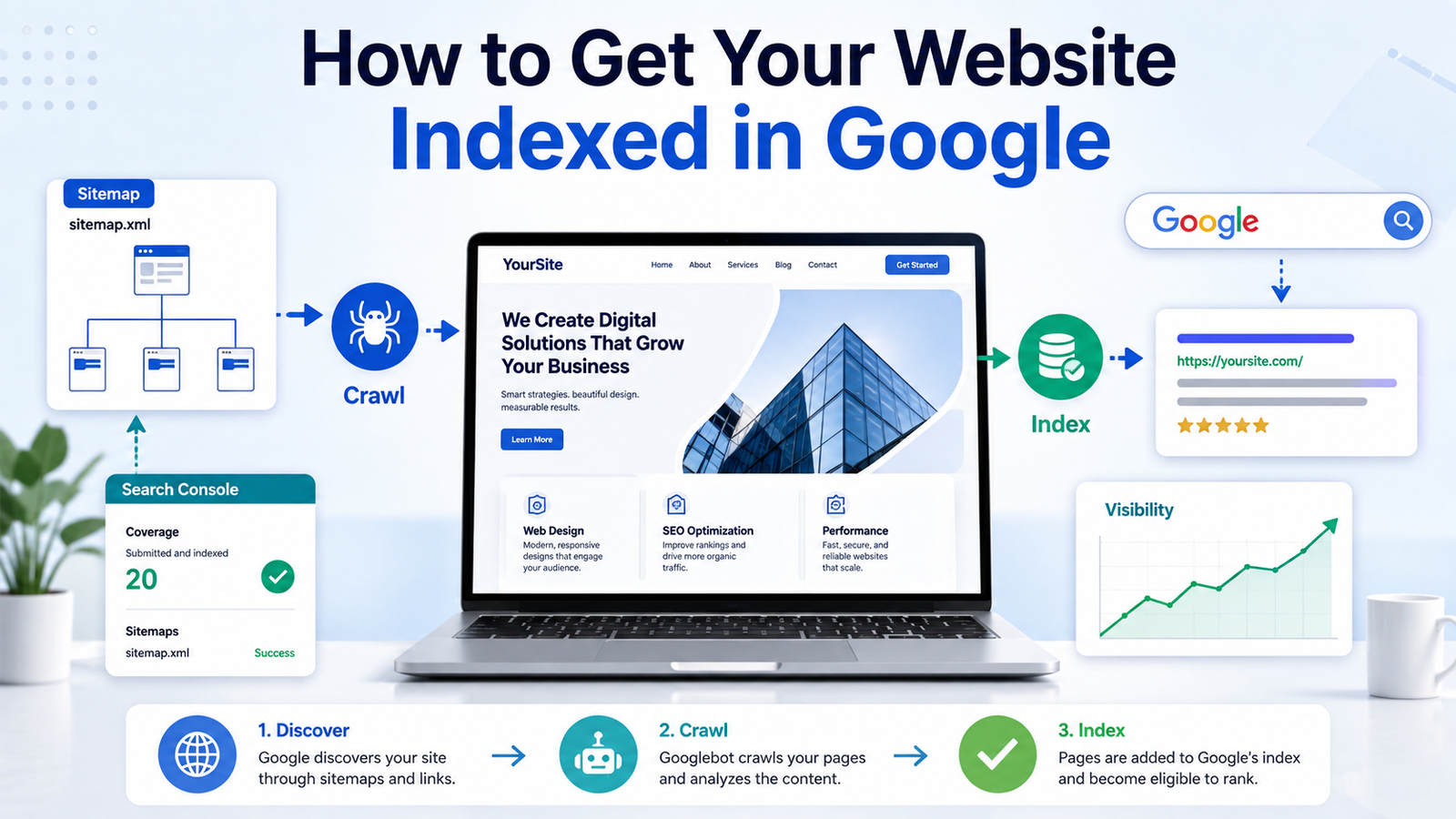
Creating a website does not automatically mean that it will immediately appear in Google Search. Before a page can rank for keywords, Google must first discover it, crawl it and add it to its search index. Google usually finds websites automatically through links and its web crawlers, but new sites—especially those with few external links—can sometimes take longer to be discovered. Fortunately, there are several steps you can take to make your website easier for Google to find, understand and index.
Understanding Crawling, Indexing and Ranking
It is important to understand that crawling, indexing and ranking are three different processes. Crawling occurs when Googlebot visits a page and downloads its content. Indexing happens when Google analyzes that content and decides whether to store it in Google’s search database. Ranking takes place later, when Google decides where an indexed page should appear for a particular search. A page can be crawled without being indexed, and an indexed page is not guaranteed to rank prominently.
The first thing you should do is check whether Google has already indexed your website. Open Google Search and enter site:yourwebsite.com, replacing the example with your domain. The results can show pages from your site that Google currently knows about. However, this search is only a general check and might not display every indexed page. Google Search Console provides more reliable information about the indexing status of specific URLs.
Set Up Google Search Console
Google Search Console is the most important tool for checking and improving your website’s presence in Google Search. It is free and allows you to confirm ownership of your website, submit a sitemap, inspect individual pages, review indexing problems and see which searches are bringing people to your site.
When adding your site, you can choose between a domain property and a URL-prefix property. A domain property generally provides the most complete view because it can include all versions of your website, including HTTP, HTTPS and different subdomains. Google will require you to verify that you control the domain, commonly by adding a DNS record through your domain registrar.
After verification, open the Page Indexing report in Search Console. This report shows the indexing status of URLs Google knows about and identifies reasons certain pages might not have been indexed. Examples may include pages blocked by a noindex instruction, duplicate pages, redirects, server errors or pages Google discovered but has not yet indexed.
Create and Submit an XML Sitemap
An XML sitemap is a file containing a list of important URLs on your website. It helps Google understand which pages you consider important and can make it easier for Googlebot to discover new or recently updated content. A sitemap can be particularly helpful for a new site with few backlinks, a large website, or a site containing many images, videos or news articles.
Many website platforms automatically create a sitemap. Common locations include:
https://yourwebsitegoeshere.com/sitemap.xml
or
https://yourwebsitegoeshere.com/sitemap_index.xml
WordPress SEO plugins, Wix, Squarespace and many other content-management systems can generate and update sitemaps automatically. Make sure the sitemap contains only the pages you actually want Google to index. Avoid including deleted pages, redirects, duplicate URLs, private pages or URLs marked with noindex.
To submit the sitemap, open Google Search Console, select Sitemaps, enter the sitemap’s address and choose Submit. Submitting a sitemap does not guarantee that every listed page will be indexed, but it gives Google a clear list of URLs to consider crawling.
Request Indexing for Important Pages
For a new page or a page that has recently undergone major changes, use Search Console’s URL Inspection tool. Enter the complete URL, review its current status and select Test Live URL if necessary. When the page is accessible to Google, choose Request Indexing.
This adds the URL to Google’s crawling queue. It does not guarantee immediate indexing, and repeatedly submitting the same page will not necessarily make the process faster. Request indexing is most useful for a limited number of important pages, such as a new homepage, major article, product page or newly redesigned section. For larger numbers of URLs, rely on your sitemap and strong internal linking.
Make Sure Google Is Allowed to Crawl Your Site
A small technical mistake can prevent an entire website from being crawled. Check the robots.txt file at:
https://yourwebsitegoeshere.com/robots.txt
This file tells crawlers which parts of your site they are allowed to request. A rule such as the following could block Googlebot from crawling the entire site:
User-agent: *Disallow: /
This rule is sometimes used while a website is under development and then accidentally left in place after launch. Remove unintended blocking rules before requesting indexing.
A robots.txt file primarily controls crawling; it is not the correct tool for reliably removing pages from Google Search. A blocked URL can sometimes still appear in search results without a description if Google discovers it through another link. To prevent a page from being indexed, use a noindex instruction or require a password for private content.
Check for Accidental Noindex Instructions
A noindex tag directly tells Google not to include a page in its search results. It can appear in the HTML source code like this:
<meta name="robots" content="noindex">
It can also be delivered through an X-Robots-Tag HTTP response header. Website builders and WordPress plugins sometimes include a setting such as “Discourage search engines from indexing this site.” That setting may add noindexinstructions across the website.
Remove noindex from any public page that should appear in search. Google must be permitted to crawl the page so that it can see the updated instruction. After correcting the issue, test the live URL and request indexing through Search Console.
Use Correct Canonical URLs
Duplicate pages can make it unclear which URL Google should index. For example, the same page might be available through several addresses containing tracking parameters, category paths or both HTTP and HTTPS versions. A canonical tag identifies the preferred version:
<link rel="canonical" href="https://yourwebsite.com/preferred-page/">
Make sure your canonical tags point to the correct live URLs. The URL in your sitemap, internal links and canonical tag should generally agree. A common indexing problem occurs when a page accidentally declares another URL as canonical, causing Google to treat the original page as a duplicate.
Redirect all unnecessary versions of your site to one primary version. For example, choose whether the preferred address uses www or does not use www, and make sure HTTP requests redirect to HTTPS. Consistent URLs make crawling more efficient and reduce duplicate-page confusion.
Build a Clear Internal-Linking Structure
Googlebot discovers many pages by following links from pages it has already crawled. Every important page should have at least one crawlable internal link pointing to it. Do not rely solely on a site search box, JavaScript interaction or XML sitemap to expose important content.
Link new articles from your homepage, blog page, category pages and related older articles. Use descriptive anchor text that tells readers and Google what the linked page contains. For example, “guide to choosing a Mac monitor” provides more useful context than “click here.” Google uses links both to discover pages and as signals for understanding their relevance.
Avoid orphan pages, which are pages with no internal links pointing to them. Even when an orphan page appears in a sitemap, Google may treat it as less important because it is disconnected from the rest of the website.
Publish Useful and Original Content
Technical accessibility is only one part of indexing. Google may crawl a page and decide not to index it when the content is extremely thin, repetitive, automatically generated without added value or substantially similar to another page.
Each important page should provide a clear purpose and enough original information to satisfy the person who lands on it. Use a descriptive title, a clear primary heading, organized sections and natural language. Answer the question suggested by the page title rather than filling the page with repeated keywords.
For an article, add original explanations, examples, firsthand observations, useful comparisons or supporting images. For a product or deals website, avoid publishing hundreds of nearly identical pages with little more than a product name and affiliate link. Add pricing context, compatibility information, buying advice, specifications and explanations of why a particular offer may be valuable.
Make the Mobile Version Complete
Google uses the mobile version of a website’s content for indexing and ranking. Your mobile pages should therefore contain the same important text, headings, images, links and structured data as the desktop version. Do not hide substantial portions of an article from mobile visitors or provide a stripped-down mobile page that lacks the primary content.
Test the site on a phone and verify that text is readable, menus work, buttons are easy to select and content does not extend beyond the screen. Mobile usability does not guarantee indexing, but a poorly designed or incomplete mobile version can make it harder for Google to evaluate the page properly.
Make Sure Pages Load Correctly
Google must receive a successful HTTP response to index a normal webpage. Important pages should usually return a 200 OK status. Pages returning errors such as 404 Not Found, 403 Forbidden or repeated 500 server errors may not be indexed.
Check that your hosting service is stable and that security tools are not blocking Googlebot. Overly aggressive firewalls, bot-protection services and content-delivery-network settings can mistakenly block legitimate Google crawlers. Googlebot also renders JavaScript using a recent version of Chrome, but blocked scripts or content that fails to render can prevent Google from seeing the complete page.
Whenever possible, place the essential text and links in the page’s initial HTML rather than requiring complicated user interactions. JavaScript-heavy sites can be indexed, but they introduce more opportunities for rendering delays or errors.
Earn Legitimate Links and Mentions
A new website with no outside links may take longer to be discovered because Google often finds new URLs by following links from websites it already knows. A few legitimate links from relevant websites can help Google discover your site and can also improve its credibility.
Useful approaches include adding your website to your company’s established social profiles, obtaining mentions from organizations you work with, contributing useful information to industry publications and creating resources that other websites naturally want to reference. Avoid buying large packages of low-quality links or participating in schemes designed solely to manipulate rankings.
For a local business, create and maintain an accurate Google Business Profile and seek listings in reputable local or industry directories. Keep the company name, address, phone number and website consistent across those services.
Keep URLs Simple and Permanent
Use readable URLs that describe the page rather than long strings of random parameters. A URL such as:
yourwebsite.com/guides/best-monitors-for-mac
is easier to understand than:
yourwebsite.com/page?id=4829&category=17&ref=abc
Once an important page is published, avoid changing its URL without a good reason. When a URL must change, create a permanent redirect from the old address to the new one and update your internal links, sitemap and canonical tag. Google recommends logical, crawlable URL structures so its systems can process a site efficiently.
Diagnose “Discovered—Currently Not Indexed”
One message frequently seen in Search Console is Discovered—currently not indexed. This means Google knows the URL exists but has not yet crawled it. The problem can occur when a site has a large number of low-value URLs, weak internal linking, limited server resources or relatively little demonstrated importance.
Improve the page, link to it from a relevant high-value page and confirm that your server is responding normally. Remove unnecessary URLs from your sitemap and avoid generating large numbers of tag pages, search-result pages, filtered URLs or duplicate archives.
Diagnose “Crawled—Currently Not Indexed”
Another common status is Crawled—currently not indexed. This means Google visited the page but did not add it to the index at that time. The page may be too similar to another URL, contain limited original value, use a conflicting canonical tag or simply require more time.
Compare the page with competing and related pages. Make the content more complete and distinctive, verify its canonical URL and strengthen the internal links pointing to it. Do not simply change a few words and repeatedly request indexing. A meaningful improvement to the usefulness and uniqueness of the page is more likely to help.
Avoid Creating Too Many Low-Value Pages
Some websites unintentionally create thousands of unnecessary URLs through filters, tags, calendars, internal search results, tracking parameters and paginated archives. These pages can consume Googlebot’s attention while making the site appear repetitive.
Focus your sitemap and internal-linking structure on pages that offer genuine value. Consolidate overlapping articles, remove outdated pages that have no purpose and redirect old URLs when a newer page replaces them. A smaller group of useful, well-connected pages is often more effective than a very large collection of thin pages.
How Long Does Google Indexing Take?
There is no guaranteed indexing time. A page might be indexed within hours, while another could take days or weeks. Google does not guarantee that it will crawl or index a page, even when it follows Google’s technical requirements.
New sites usually require patience because they have not yet developed a crawling history or earned many links. Continue publishing useful content, maintaining the sitemap and creating internal links rather than submitting the same URL every day.
A Practical Google Indexing Checklist
Before waiting for Google to index a page, confirm the following:
- The page is publicly accessible and returns a successful status.
- Googlebot is not blocked in
robots.txt. - The page does not contain an accidental
noindexinstruction. - The canonical tag points to the correct URL.
- The URL appears in the XML sitemap.
- At least one other page on the website links to it.
- The mobile version contains the complete content.
- The page offers original and useful information.
- Search Console does not report a major technical error.
- The live URL has been tested and, when appropriate, submitted for indexing.
Final Thoughts
Getting a website indexed by Google is not about finding a secret submission form or paying someone to force pages into search results. Google does not accept payment to crawl a site more frequently or rank it higher. The most reliable approach is to make the website technically accessible, submit a clean sitemap, build a logical internal-linking structure and publish content that deserves to appear in search.
Google Search Console should be your main source for diagnosing problems. Check the Page Indexing report regularly, inspect important URLs and correct the specific reason Google provides when a page is excluded. Once Google can crawl the site easily and sees consistent evidence that its pages are useful, indexing should become more reliable over time.