
For many years, Mac users believed Apple computers were almost immune to viruses and malware. While Macs have traditionally been safer than many Windows PCs, that idea is no longer completely accurate. In 2026, Macs absolutely can get malware, phishing attacks, spyware, browser hijackers, ransomware, and other threats. However, Apple has also built one of the strongest built-in security systems in the consumer computer industry. The real question today is not whether Macs can get viruses — they can — but whether Apple’s onboard protections are good enough for most users or if additional antivirus software is worth installing.
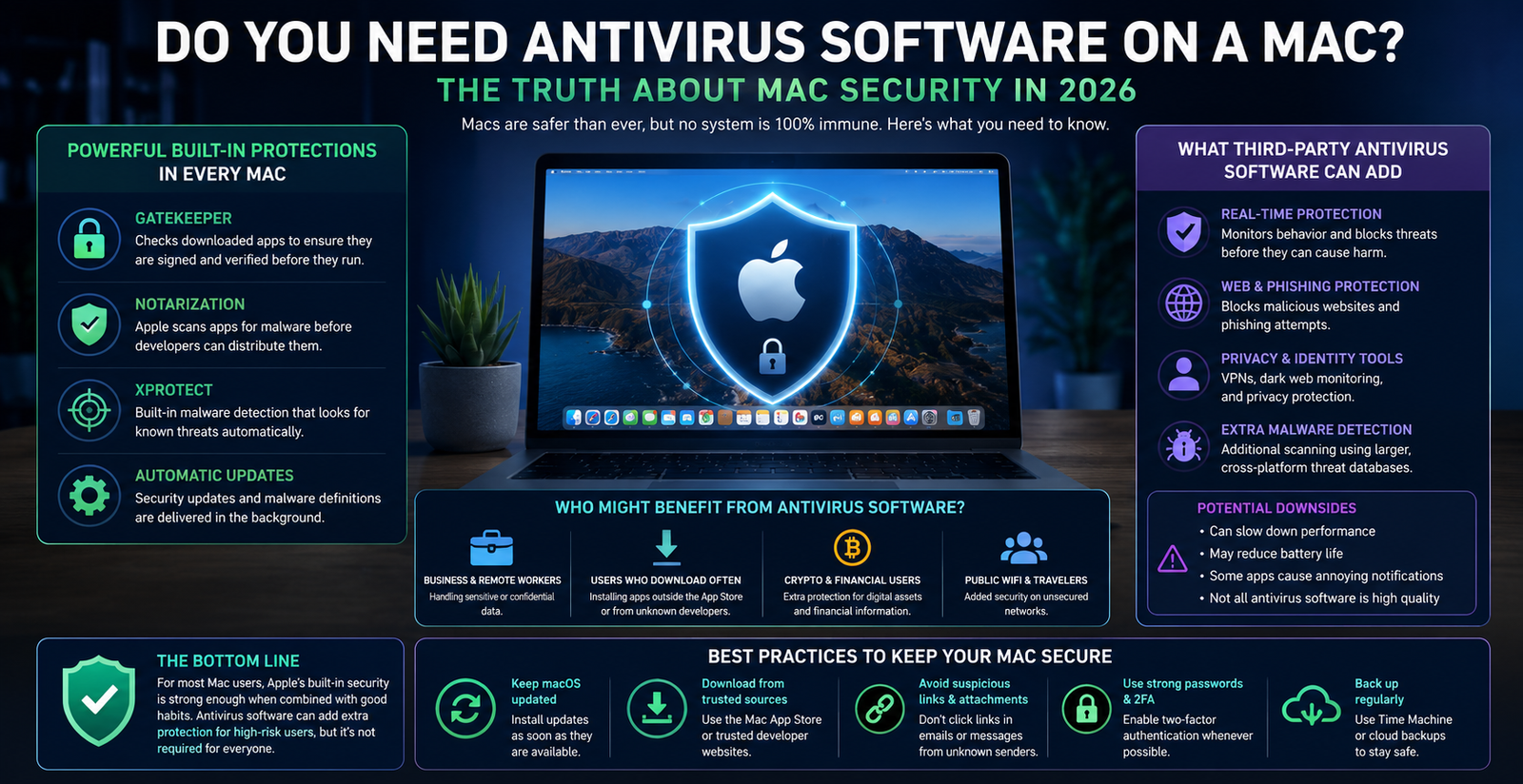
Modern versions of macOS include several layers of built-in security that quietly protect users behind the scenes. One of the most important is Gatekeeper, which checks downloaded apps to ensure they are properly signed and verified before they can run on your Mac. Apple also uses a process called Notarization, where developers submit software to Apple for automated malware scanning before distribution. On top of that, macOS includes XProtect, Apple’s built-in malware detection system that continuously checks for known malicious software. Apple updates these protections automatically in the background, often without the user even noticing.
For the average Mac user, these built-in protections are usually strong enough when combined with good browsing habits. If you mainly download apps from the Mac App Store or trusted developers, avoid suspicious websites, keep macOS updated, and do not click questionable links in emails or text messages, your risk of infection is relatively low. Apple’s security architecture is designed to block many common attacks before they even start, and in recent years Apple has significantly improved how quickly security patches and malware definitions are distributed.
That said, Macs are becoming more popular targets for hackers because Apple’s market share has grown substantially. Security researchers have noted a steady increase in Mac malware families over the past several years, including adware, credential stealers, fake software installers, and browser exploits. Cybercriminals increasingly view Mac users as valuable targets because many Mac owners are perceived to have higher incomes and store sensitive information on their devices. Some attacks have even bypassed Apple’s security systems using stolen developer certificates or weaknesses in notarized applications.
This is where third-party antivirus software can still provide value. Programs from companies like Malwarebytes, Bitdefender, Norton, and Sophos often include extra layers of protection beyond Apple’s built-in tools. These can include real-time behavioral monitoring, phishing protection, ransomware detection, dark web monitoring, VPN services, malicious website blocking, and broader cross-platform threat databases. Some antivirus tools are especially useful for people who frequently download software outside the App Store, visit unfamiliar websites, work in business environments, or handle sensitive client data.
However, antivirus software is not always perfect on a Mac. Some security programs can slow down system performance, reduce battery life, create annoying notifications, or interfere with certain apps. In the past, some Mac users installed antivirus software that caused more frustration than benefit. That is why many security experts recommend avoiding heavy “all-in-one” security suites unless you truly need the advanced features. Lightweight tools focused mainly on malware scanning are often a better choice for Mac users who want occasional extra peace of mind without hurting performance.
So should you install additional antivirus software on your Mac in 2026? For many people, the answer is probably “not necessarily.” Apple’s built-in protections are now very strong and are sufficient for a large percentage of home users. If you are careful online, keep your Mac updated, use trusted software sources, and avoid risky downloads, you can safely use a Mac without third-party antivirus in most situations. Apple’s security systems already provide layered protection that is far beyond what Macs had a decade ago.
On the other hand, some users should seriously consider additional protection. People who work with sensitive business data, cryptocurrency, financial records, or confidential client information may benefit from extra security layers. The same applies to users who frequently install software from unofficial sources, torrent sites, cracked applications, or experimental developer tools. In those situations, third-party antivirus software can add meaningful protection that Apple alone may not fully provide.
Ultimately, the best “antivirus” for a Mac is still a combination of smart habits and keeping your system updated. Most successful attacks today rely on tricking users rather than breaking through Apple’s technology directly. Whether or not you install additional antivirus software, staying cautious online, avoiding suspicious downloads, enabling two-factor authentication, and regularly updating macOS remain the most important steps you can take to keep your Mac secure in 2026.