
When buying a new Apple Mac computer, one of the most important decisions is how much RAM, also known as unified memory, you should choose. Apple’s modern Macs powered by Apple Silicon chips such as the M1, M2, M3, M4, and future generations use a unified memory architecture that works differently than traditional PCs. Because of this design, Macs are often able to perform better with lower amounts of RAM compared to many Windows computers. However, that does not mean RAM is unimportant. Choosing the right amount of memory can dramatically impact performance, multitasking ability, longevity, and professional workflows.
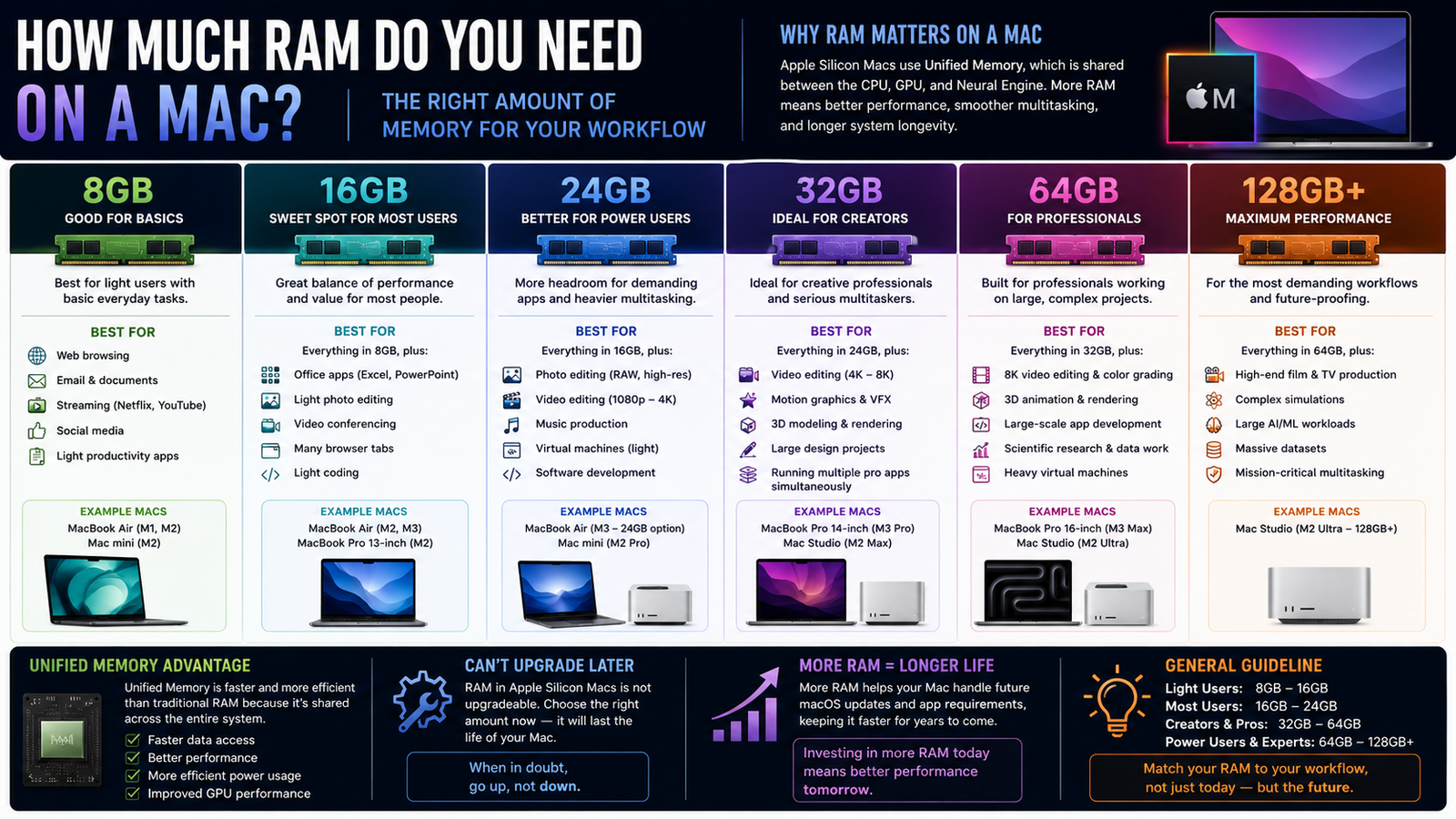
For many users, understanding how much RAM they actually need can be confusing. Apple sells Macs with configurations ranging from 8GB all the way up to 512GB or more on high-end workstations. The right amount depends entirely on how the computer will be used. Some users only browse the web and watch videos, while others edit 8K video, run local AI models, or work with massive professional applications that consume enormous amounts of memory.
One of the reasons Apple Silicon Macs handle memory differently is because the RAM is built directly into the chip package itself. Apple calls this Unified Memory Architecture. Instead of having separate memory pools for the CPU and GPU, both share the same fast pool of memory. This reduces latency and improves efficiency. Tasks such as video editing, graphics rendering, gaming, AI workloads, and multitasking often benefit from this design because data can move much faster between components.
The entry-level amount of RAM on many Macs today is 8GB. For very basic users, 8GB can still work surprisingly well thanks to Apple Silicon efficiency. People who primarily browse the web, use email, stream video, write documents, manage spreadsheets, and perform light productivity tasks may find 8GB acceptable. Students who mainly use Safari, Microsoft Office, Google Docs, or basic school applications can often use an 8GB Mac without major issues. Casual users who only keep a few applications open at a time may also be perfectly happy with this configuration.
However, while 8GB can work for basic tasks today, it is becoming increasingly limiting for modern computing. Web browsers themselves now consume significant amounts of memory, especially when dozens of tabs are open. Applications continue becoming more advanced, AI features are being integrated into software, and multitasking demands continue increasing. For this reason, many technology professionals no longer recommend 8GB for users planning to keep a Mac for many years.
For most people, 16GB has become the sweet spot. A Mac with 16GB of unified memory provides a much smoother experience for multitasking, productivity, and general long-term use. Users who keep many browser tabs open, work with multiple applications simultaneously, or perform light creative work will benefit greatly from 16GB. This amount of RAM is ideal for professionals using Photoshop, Lightroom, Final Cut Pro for moderate video editing, Logic Pro for music production, coding applications, and office productivity tools.
A 16GB Mac is often the best balance between price and performance for the majority of buyers. It allows the computer to remain fast under heavier workloads while also providing better future-proofing. Users who plan on keeping their Mac for five years or longer should strongly consider moving to 16GB even if their current tasks seem fairly basic today.
For more demanding users, 24GB or 32GB of RAM begins making a noticeable difference. These configurations are ideal for serious content creators, professional photographers, advanced video editors, software developers, engineers, and power users. Video editing in 4K or 8K resolution can consume enormous amounts of memory, especially when working with multiple video streams, effects, transitions, and large media libraries.
Photographers working with extremely high-resolution RAW images also benefit from larger memory configurations because editing software loads huge image files directly into memory during processing. Music producers using large sample libraries and many virtual instruments may also need additional RAM to avoid slowdowns during complex projects.
Software developers are another group that often benefits from larger memory amounts. Developers frequently run multiple applications simultaneously including code editors, virtual machines, local servers, databases, browsers, simulators, and development environments. Running virtualization software or Docker containers can quickly consume large amounts of RAM. Developers working on AI applications or machine learning projects especially benefit from higher memory capacities.
A 32GB Mac is often considered the starting point for serious professional work. Professionals editing large video projects, running advanced design software, using complex engineering applications, or multitasking heavily throughout the day will notice substantial performance improvements with 32GB compared to lower configurations.
Once users move into the 64GB range and beyond, they enter workstation-level computing. These Macs are designed for extremely demanding workloads involving advanced video production, 3D rendering, large-scale software development, AI training, scientific simulations, audio production, and enterprise-level tasks. Professionals working in Hollywood production environments, advanced animation studios, architectural rendering, or professional music production often require this level of performance.
AI workloads have become one of the biggest reasons users are purchasing high-memory Macs today. Running local large language models, image generation software, AI video tools, and machine learning frameworks can consume enormous amounts of memory. Many advanced AI models require 32GB, 64GB, or even more RAM to run efficiently. Users experimenting with local AI applications often discover quickly that memory becomes one of the most important limitations.
Apple’s high-end Mac Studio and Mac Pro systems can now support extremely large amounts of unified memory, including 96GB, 128GB, 192GB, and even 512GB in some configurations. These systems target professionals with highly specialized workloads that require enormous datasets or advanced parallel processing. For example, editing multiple streams of uncompressed 8K video or running massive AI models locally can easily consume over 100GB of RAM.
Gaming on a Mac can also benefit from additional memory, although gaming itself is not usually as memory-intensive as professional creative work. Most modern Mac games perform well with 16GB or 24GB of RAM. However, users who game while multitasking heavily, streaming gameplay, recording footage, or running many background applications may benefit from higher capacities.
One important thing to remember when purchasing a Mac is that Apple Silicon memory is not upgradeable later. Unlike many traditional desktop PCs, the RAM is permanently integrated into the chip package. This means buyers must choose carefully when configuring their Mac because the amount of memory purchased on day one is the amount the computer will have forever.
Future-proofing therefore becomes extremely important. Many users regret buying too little RAM after a few years once applications become more demanding. While upgrading from 8GB to 16GB or from 16GB to 32GB increases the upfront cost, it can dramatically extend the usable lifespan of the computer and improve the overall experience over time.
For basic users, students, and casual computing tasks, 8GB may still work, although 16GB is increasingly recommended even for average users. For most people buying a Mac today, 16GB provides the best overall balance of performance, multitasking, and longevity. Creative professionals, advanced multitaskers, and developers should strongly consider 24GB or 32GB. Serious workstation users, AI developers, filmmakers, engineers, and enterprise professionals often require 64GB or far more.
As software continues evolving and AI becomes integrated into more workflows, memory requirements will likely continue increasing. Choosing the correct amount of RAM today is not only about current needs but also about preparing for future applications and workloads. A properly configured Mac with enough unified memory can remain fast, responsive, and highly capable for many years, making RAM one of the most important decisions when purchasing an Apple computer.