
USB has become one of the most important technologies in modern computing. From charging smartphones and connecting monitors to transferring huge video files and powering accessories, USB is everywhere. Over the years, however, USB standards have become increasingly confusing. Terms like USB-C, USB 3.2 Gen 2, Thunderbolt 4, USB4, and USB 2.0 are often used together even though they describe very different things. Many consumers assume that if two ports look the same, they perform the same way, but that is no longer true in today’s technology landscape.
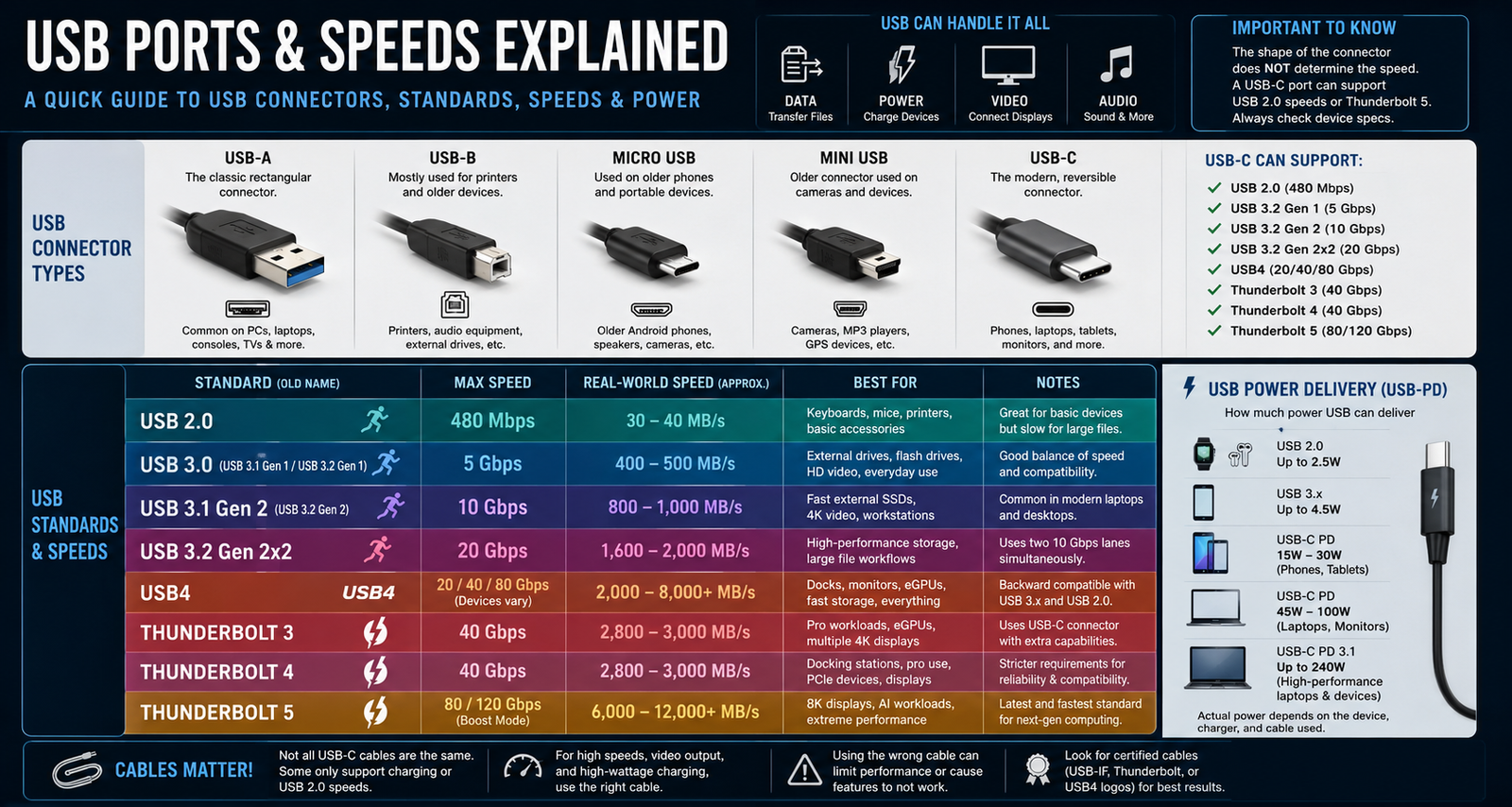
One of the most important things to understand about USB is that there are two separate concepts involved: the physical connector type and the data standard itself. For example, USB-C is simply the shape of the connector. It does not automatically mean a device is fast. A USB-C port may support slow USB 2.0 speeds, modern USB4 speeds, or even ultra-fast Thunderbolt 5 performance while looking completely identical on the outside. This has created a great deal of confusion for buyers trying to understand what their devices are actually capable of doing.
The original and most recognizable USB connector is USB-A. This is the traditional rectangular port that appeared on computers for decades and is still found on many desktop PCs, gaming consoles, televisions, and accessories. USB-A ports can support several different speed standards depending on the hardware. Older USB 2.0 versions support transfer speeds up to 480 Mbps, while newer USB 3.x versions can deliver 5 Gbps or even 10 Gbps speeds. Blue-colored USB-A ports often indicate faster USB 3.x support, although manufacturers are not always consistent with this color coding.
Another older connector type is USB-B, which is mostly used for printers, audio equipment, and specialized hardware. USB-B connectors are square-shaped and far less common today than they once were. Before USB-C became popular, Micro USB and Mini USB connectors dominated smartphones, cameras, and portable electronics. Micro USB was especially common on Android phones for many years. These older connectors have largely disappeared as USB-C has taken over the market.
USB-C is now the modern standard for nearly all new devices. It is smaller, reversible, and far more versatile than previous USB connectors. Unlike older USB types, USB-C can carry data, power, video, and audio through a single cable. Modern laptops, smartphones, tablets, gaming handhelds, and monitors increasingly rely on USB-C for everything from charging to high-speed data transfers. The connector itself is incredibly flexible, but once again, the actual speed depends entirely on the technology implemented behind the port.
USB 2.0 was one of the most important standards in computing history and helped popularize USB worldwide. Introduced in 2000, it offered speeds up to 480 Mbps, which was considered very fast at the time. In real-world use, however, most USB 2.0 devices transfer data much slower than the theoretical maximum. USB 2.0 is still perfectly fine for accessories such as keyboards, mice, printers, webcams, and basic charging. However, it feels extremely slow when transferring large files or using modern external SSDs.
The next major leap came with USB 3.0, which dramatically increased transfer speeds to 5 Gbps. Unfortunately, USB naming became confusing because USB 3.0 was later renamed USB 3.1 Gen 1 and then later called USB 3.2 Gen 1. Despite the changing names, these standards are effectively the same technology. USB 3.x brought massive improvements for external hard drives, flash drives, docking stations, and professional workflows involving large files or video editing.
USB 3.2 Gen 2 doubled performance again by increasing speeds to 10 Gbps. This standard is now common on modern laptops, desktops, and premium accessories. USB 3.2 Gen 2 allows external SSDs to perform much closer to their full potential while also improving support for higher-resolution displays and demanding workloads. A newer variation called USB 3.2 Gen 2×2 pushed speeds up to 20 Gbps by using two simultaneous data lanes, although adoption of this standard has been somewhat limited because many companies moved directly toward USB4 and Thunderbolt technologies instead.
USB4 represents one of the biggest advancements in USB history. Built partly on Thunderbolt technology, USB4 significantly improves performance, compatibility, and functionality. Depending on the device, USB4 can support speeds ranging from 20 Gbps to 40 Gbps, with newer implementations eventually reaching even higher levels. USB4 improves support for high-speed storage, multiple monitors, docking stations, and external GPUs while also helping standardize features across devices. Many modern premium laptops now include USB4 support as manufacturers continue transitioning toward this newer standard.
Thunderbolt technology takes USB-C even further. Thunderbolt 3 and Thunderbolt 4 both use the USB-C connector but provide additional capabilities far beyond standard USB connections. Thunderbolt supports extremely high-speed data transfers, multiple high-resolution displays, external GPUs, and direct PCIe connectivity. Both Thunderbolt 3 and Thunderbolt 4 support speeds up to 40 Gbps, but Thunderbolt 4 introduced stricter minimum requirements for compatibility, display support, and docking station performance. Thunderbolt has become especially popular among creative professionals, video editors, and power users who need maximum performance from external devices.
The newest version, Thunderbolt 5, pushes performance even further. Thunderbolt 5 can deliver up to 80 Gbps of bandwidth and even higher speeds in certain boosted modes. This new standard is designed for next-generation workflows involving AI processing, 8K video editing, advanced gaming setups, and extremely fast storage arrays. As computing demands continue increasing, Thunderbolt 5 is expected to play a major role in future high-performance computers and accessories.
USB is no longer only about data transfers. Charging capability has become equally important. Older USB 2.0 ports typically provide only a few watts of power, which is sufficient for basic accessories but far too slow for modern devices. USB-C Power Delivery, often called USB-PD, changed this completely by allowing much higher charging levels. Depending on the device and charger, USB-C can now deliver enough power to charge smartphones, tablets, gaming systems, monitors, and even large laptops. Newer USB-C standards can provide up to 240 watts of power, making USB-C one of the most versatile charging systems ever created.
One of the biggest problems consumers face today is cable confusion. Not all USB-C cables support the same capabilities. Some cables only handle charging and slow USB 2.0 data speeds, while others support 40 Gbps transfers, video output, and high-wattage charging simultaneously. Two cables may look identical externally while delivering dramatically different performance. This often causes frustration when users buy inexpensive cables that cannot fully support their devices.
Choosing the correct USB standard depends entirely on how the device will be used. For basic accessories like keyboards, mice, and printers, USB 2.0 is still perfectly adequate. For external SSDs and large file transfers, USB 3.2, USB4, or Thunderbolt are much better choices. Professionals working with video editing, photography, AI applications, or multiple displays will benefit most from Thunderbolt 4, Thunderbolt 5, or USB4 connections. Meanwhile, USB-C Power Delivery has become essential for modern charging needs across nearly every category of consumer electronics.
USB technology has evolved dramatically over the past two decades. What began as a simple way to connect accessories has become a universal platform capable of handling data, charging, video output, storage, and professional computing workloads through a single cable. While the growing number of standards and naming conventions can certainly be confusing, understanding the differences between connector types, transfer speeds, and charging capabilities helps consumers make smarter decisions when purchasing computers, accessories, cables, and storage devices. As the industry continues moving toward USB4 and Thunderbolt technologies, USB-C is rapidly becoming the single universal connector powering the future of modern computing.